
Supercharge Your API Security: Implementing APISIX Rate Limiting with Redis
APIs are the backbone of modern web applications, enabling seamless communication between different software components. However, an API without proper rate limiting can be a gateway for abuse, leading to service degradation or even outages. Enter APISIX, a high-performance, open-source API gateway, which makes it incredibly easy to enforce rate-limiting policies. By integrating APISIX with Redis, you can take your API’s security and performance to the next level. In this blog post, we’ll delve into the key aspects of APISIX rate limiting and how to integrate it with Redis for a robust solution.
Why Rate Limiting Is Crucial for Your API
Before diving into how APISIX and Redis make a great team for rate limiting, let us quickly review why rate limiting is vital for any API:
- Prevent Abuse: Rate limiting helps protect your API from abusive behaviors such as denial-of-service attacks (DoS), where an attacker bombards your API with an excessive number of requests.
- Control Traffic: By limiting the number of requests allowed within a given timeframe, rate limiting ensures that API traffic does not overwhelm your backend services, thus maintaining high availability and reliability.
- Cost Management: For those offering API services with a pay-as-you-use model, it helps in making sure that users stay within their quota, avoiding unforeseen costs.
- Fair Usage: It helps distribute resources equally among users so that no single user can monopolize your API resources.
What Is APISIX?
APISIX is an open-source, dynamic, real-time, high-performance API gateway that provides rich traffic management features such as load balancing, dynamic upstream, canary release, circuit breaking, authentication, observability, and more. It is designed to make it easy to manage, secure, and observe microservices.
Introduction to Redis
Redis is an open-source, in-memory data structure store used as a database, cache, and message broker. It supports various data structures such as strings, hashes, lists, sets, and sorted sets with range queries. Redis is known for its high-performance read and write operations, which make it an excellent candidate for rate-limiting purposes where quick lookups and updates are necessary.
Integrating APISIX with Redis for Rate Limiting
APISIX offers a powerful plugin called limit-count that leverages Redis for storing and managing request count data efficiently. The limit-count plugin allows you to limit the request count based on a fixed window algorithm where the window duration could be per seconds, minutes, hours, or days.
How Does the limit-count Plugin Work?
The limit-count plugin works as follows:
- The plugin counts requests sent to an API within a configured time window.
- If the request count exceeds the specified limit, it returns a 503 HTTP status code (although this code is configurable) until the window resets.
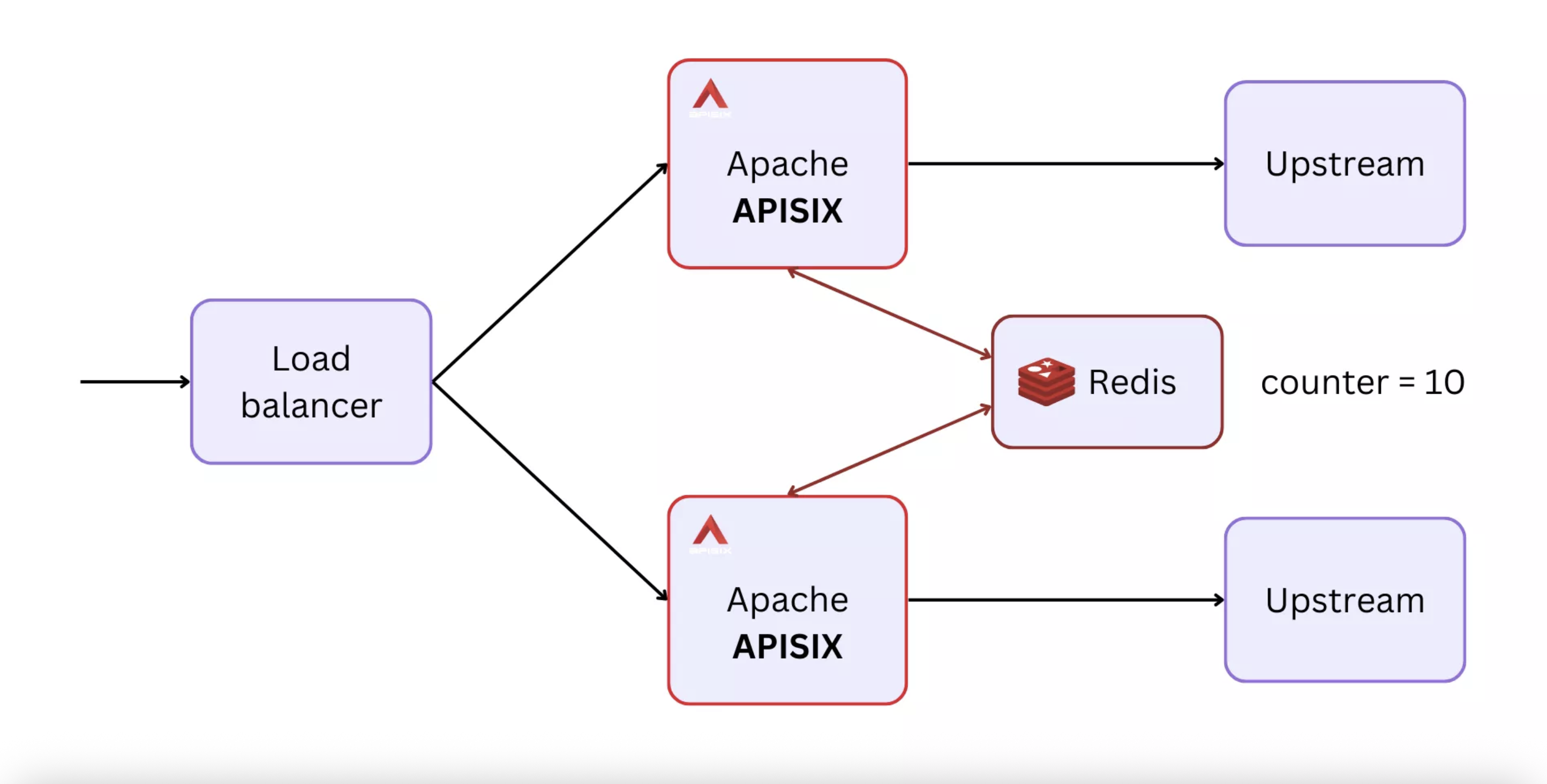
- The plugin stores the request count in Redis, which makes it possible to maintain a centralized and persistent state for rate limiting across multiple API gateway instances.
Setting Up APISIX with Redis for Rate Limiting
Here is a step-by-step guide on how you can configure rate limiting for APISIX using Redis:
1. Install APISIX and Redis
First, make sure you have APISIX installed and running. You can follow the official APISIX documentation for installation instructions. Similarly, make sure that your Redis server is installed and running.
2. Enable the limit-count Plugin
You can enable the limit-count plugin in a global or a route-specific manner. For this example, let’s enable it for a specific route.
{
    "plugins": {
        "limit-count": {
            "count": 2,
            "time_window": 60,
            "rejected_code": 503,
            "key": "remote_addr",
            "policy": "redis",
            "redis_host": "127.0.0.1",
            "redis_port": 6379,
            "redis_timeout": 1000,
            "redis_password": "yourpassword",
            "redis_database": 1
        }
    },
    "upstream": {
        "type": "roundrobin",
        "nodes": {
            "127.0.0.1:1980": 1
        }
    },
    "uri": "/anything"
}
In this plugin configuration:
countis the maximum number of requests allowed within the time window (here set to 2).time_windowis the time window length in seconds (here set to 60 seconds).rejected_codeis the HTTP status code that should be returned when the request count exceeds the limit (default is usually 503).keydefines what should be used to distinguish clients (e.g.,"remote_addr"to use the client's IP address, but it could be a user ID or an API key as well).policyis set to"redis"to use Redis to store the request count.- Other
redis_*parameters specify the connection details for your Redis server.
3. Test the Configuration
To make sure that rate limiting is working as expected, make a few requests to the configured route within the defined time window. After the first two requests (as per the given configuration), the third request should return a 503 status code until the time window resets after 60 seconds.
4. Monitoring and Alerts
To effectively monitor your rate limiting configurations, you can make use of APISIX metrics and log it to a monitoring tool like Prometheus or Grafana. This allows you to keep an eye on request traffic patterns and adjust your rate limiting policies as necessary.
Conclusion
Integrating APISIX with Redis for rate limiting provides a robust, high-performance solution to protect and manage your API traffic efficiently. The limit-count plugin of APISIX makes it easy to set up and customize rate limiting policies, while Redis ensures that request counts are stored in a highly performant, in-memory data store. Together, APISIX and Redis make a powerful duo to safeguard your API services from abuse and ensure a fair distribution of resources among all API consumers.
By following this guide, you should be well on your way to implementing a solid rate-limiting strategy that keeps your APIs secure and performant. Happy coding!
Lily and 4 people like this